Table of Contents
 AI cameras are no longer just cameras with analytics. They are becoming the foundation of modern AI surveillance systems—intelligent endpoints that can detect, interpret, and prioritize events in real time, then connect those insights to workflows that help teams respond faster and operate more efficiently.
This article also draws on industry insights from IDC’s InfoBrief, “From Devices to Decisions: AI at the Edge. Power in the Cloud. Security Everywhere”, sponsored by VIVOTEK Inc., alongside practical deployment considerations, to explain how AI cameras, edge AI, and GenAI-ready video capabilities are shaping modern surveillance.
What Are AI Cameras?
AI cameras combine traditional video capture with on-device or platform-based intelligence. Instead of recording footage only for later review, AI security cameras can detect objects and behaviors (people, vehicles, intrusion, PPE compliance, falls), trigger alerts, and support investigation workflows.
When combined with centralized software, these devices form a complete AI security camera system that helps organizations detect and respond to incidents more efficiently.
In short: AI cameras help security teams move from passive monitoring to active response—because events are identified and organized automatically, not discovered hours later.
How AI Cameras Differ from Traditional Cameras
Traditional cameras mainly capture and store video. Intelligence often sits downstream and still requires manual review. AI cameras, by contrast, bring detection closer to the source (the edge) and connect results to centralized management and workflows.
The practical difference is speed and focus: real-time detection, fewer missed incidents, and far less time spent scrubbing timelines to find the “one moment that matters.”
The Technology Behind AI Cameras
To understand why AI cameras outperform traditional setups, it helps to look under the hood. Most modern deployments combine three layers—AI models, edge processing, and cloud management—each solving a different operational problem.
-
Machine learning and deep learning
Most AI camera analytics are powered by deep learning models trained to detect objects and patterns. In practice, the real test is reliability across lighting changes, occlusion, and crowded scenes—and whether results can be turned into consistent operational workflows. -
Edge computing
Edge AI processes events near the camera for speed and resilience. This helps reduce latency, lowers unnecessary data transfer, and supports real-time alerting where seconds matter. -
Centralized management and workflows
Centralized management brings consistency—policy control, user roles, device health monitoring, evidence review, and reporting, especially across multi-site operations. This is where organizations standardize how events are verified, escalated, and documented.
A fast-growing trend is multimodal AI, especially vision-language models (VLMs), which makes video intelligence easier to use through natural-language interaction—unlocking GenAI-style workflows like conversational search and context-aware alerting.
GenAI-Ready Video Surveillance: From Search to Alerts (VLM)
GenAI is changing how teams use video—not by replacing detection, but by making video intelligence easier to access. With vision-language models (VLMs), operators can search and investigate using plain language (“show me deliveries at the back door after 8 pm”) instead of scrubbing timelines or memorizing complex filters—shortening investigations from hours to minutes.
Just as important, GenAI-ready experiences can improve the response loop. When alerts include clearer context (what happened, where, and why it matters), teams can prioritize incidents faster and reduce back-and-forth verification. In practice, VLM-enabled workflows typically support:
-
Natural-language video search to find events quickly
-
Smarter alert summaries to triage without replaying long clips
-
Faster incident review and reporting because evidence is easier to locate and explain
-
Lower operational friction across multi-site teams through consistent “query → verify → report” steps
For organizations evaluating AI cameras, GenAI readiness is becoming a practical differentiator: it turns video from “data you store” into “insight you can query,” without requiring more expert operators.

Key Advantages of AI Security Cameras in Modern AI Surveillance
Once detection moves closer to the edge and results connect to workflows, the benefits show up immediately in day-to-day operations—faster response, less noise, and lower investigation effort. Here are three advantages organizations typically feel first.
-
Enhanced security through real-time insights
AI cameras can identify threats as they happen and trigger response workflows immediately, helping teams react before incidents escalate. -
Reduced false alarms and better focus
Modern models distinguish routine activity from genuine threats more accurately, reducing unnecessary escalations and keeping operators focused on what truly matters. -
Cost savings and operational efficiency
AI doesn’t only prevent incidents—it reduces the time and cost of managing them. According to the IDC InfoBrief, 32% of enterprises prioritize cost reduction by streamlining data transport and storage. This is exactly where edge AI processing and smart event filtering create leverage.
AI Camera Applications Across Industries
AI camera value looks different by industry: some teams prioritize loss prevention; others focus on worker safety or multi-site standardization. Below are common real-world applications and what they typically optimize for.
-
Retail Surveillance & Stores Monitoring
AI cameras support loss prevention and operational insights—such as correlating video events with POS workflows, understanding queue patterns, and accelerating incident review. IDC InfoBrief notes that video intelligence can deliver measurable outcomes and cites retail use cases, including POS integration, queue management, and zone heatmaps, with adoption indicators like 35% of retailers using computer vision for fraud detection. -
Smart Cities and Urban Surveillance
For public spaces, the value is rapid detection plus coordinated response—especially when edge processing reduces latency and bandwidth dependency. This supports use cases like traffic/incident management, crowd safety, and event prioritization. -
Property management and multi-site operations
Property teams often need consistent standards across buildings—shared policies, centralized visibility, and faster verification when incidents happen in lobbies, elevators, parking areas, or shared facilities. -
Manufacturing and Industrial Applications
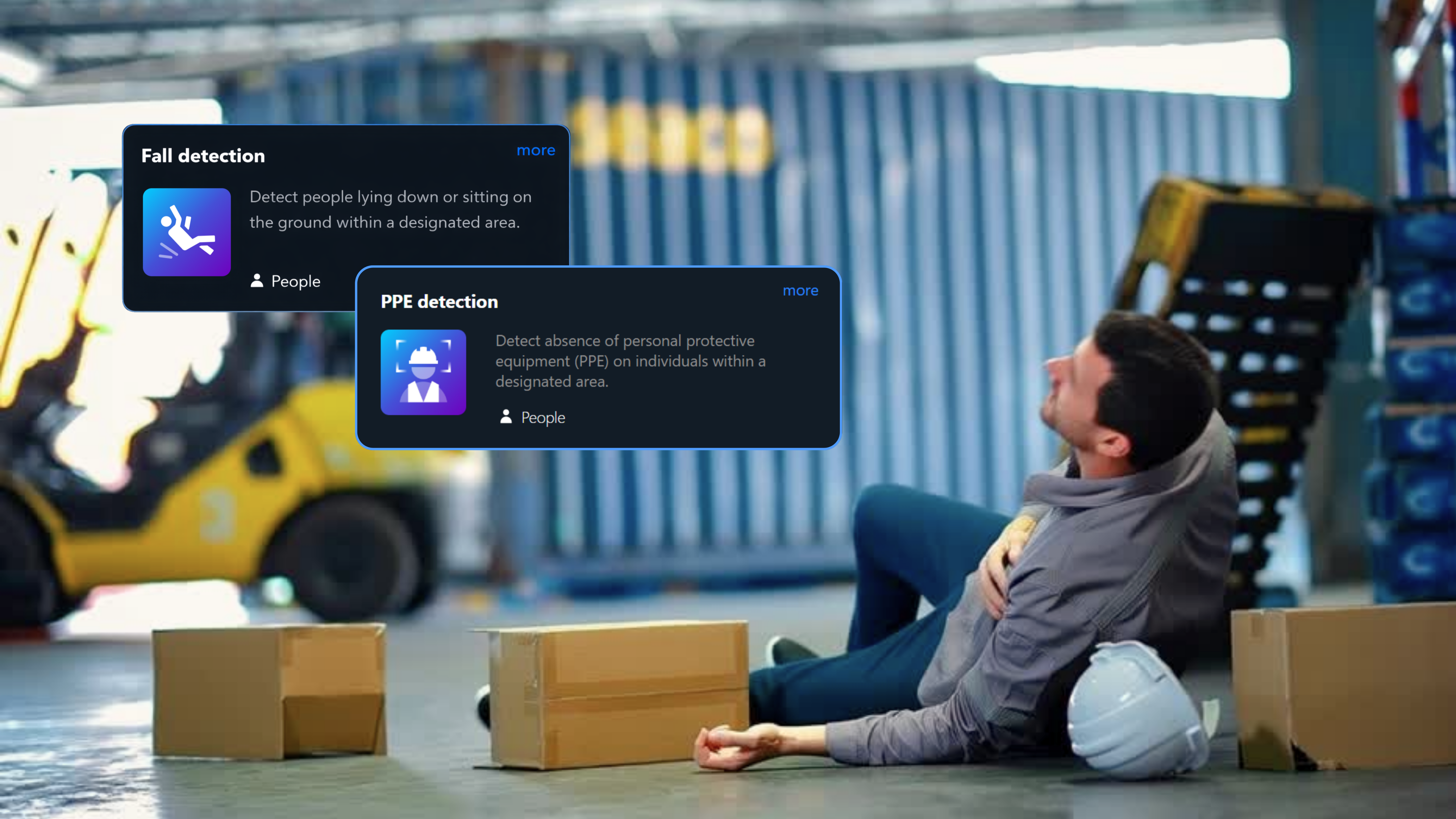
High-impact use cases include PPE compliance and fall detection, where real-time alerts help reduce risk, downtime, and post-incident uncertainty. AI’s role is also expanding into workforce wellness and safety.
How AI Cameras Improve Data Security and Privacy
As AI cameras capture more actionable insights, organizations also need stronger guardrails for privacy and data protection. The goal is to gain intelligence without over-collecting exposure, especially in regulated regions and multi-tenant environments.
-
Privacy Compliance and Smart Masking (GDPR-ready)
AI cameras can support privacy-by-design through smart masking (for faces, screens, or private zones), helping teams reduce unnecessary exposure while still capturing security-relevant events. This is especially important in shared spaces and multi-tenant properties where surveillance must align with privacy expectations and regulations such as GDPR. -
Secure Data Transmission and Cloud Integration
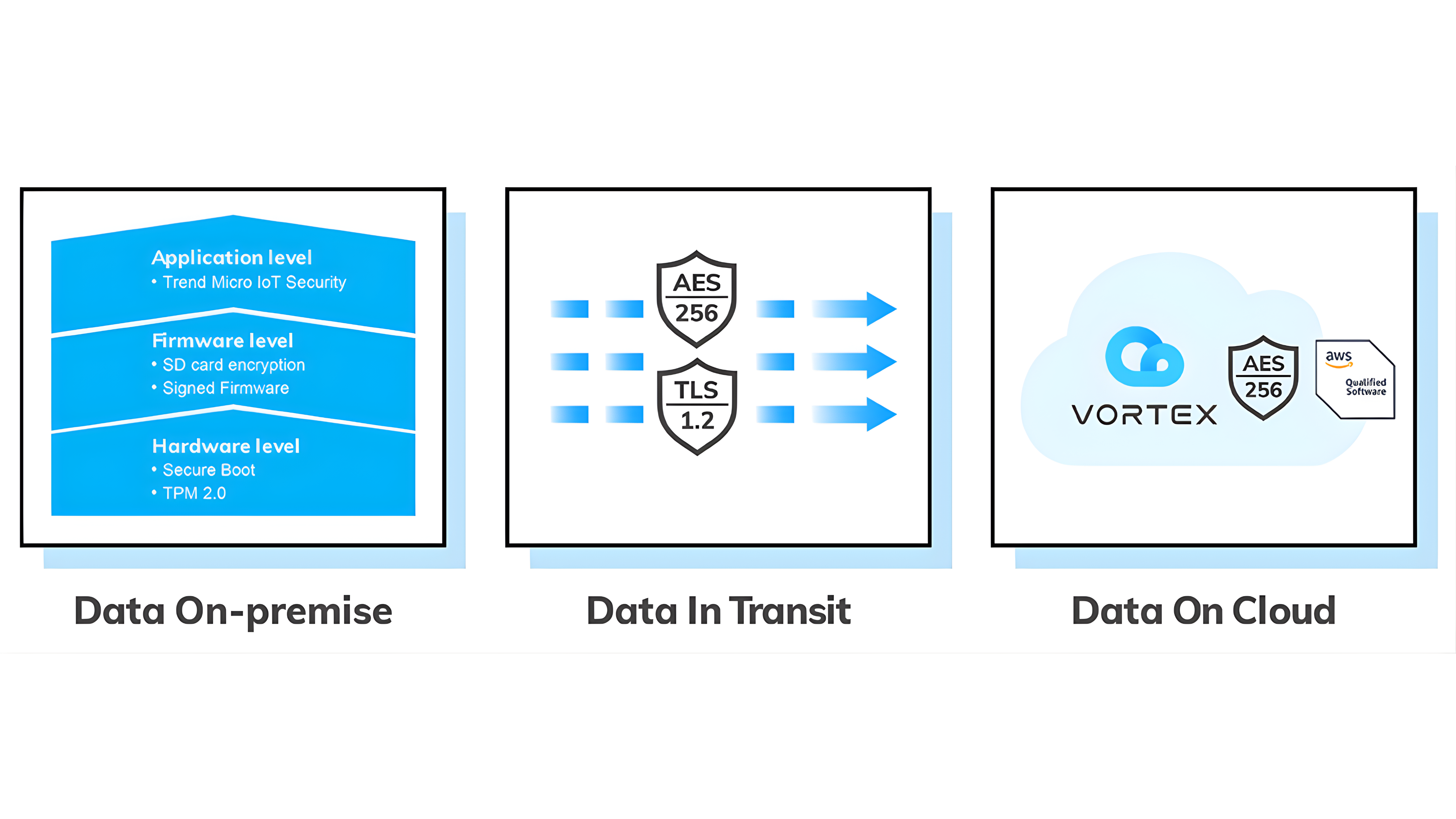
Cloud-connected AI cameras should use encrypted data transmission (e.g., TLS), strong identity and access controls, and audit trails to reduce the risk of breaches. When combined with role-based permissions and centralized policy management, organizations can scale across sites without losing governance.
Choosing the Right AI Camera for Your Business
Not every AI camera delivers the same real-world value. The fastest way to avoid mismatches is to start with operational goals—then validate how the camera, analytics, and management layer work together in your environment. Use the checklist below to compare options consistently.
|Practical checklist:
✔ Use-case fit: intrusion, loitering, PPE/fall detection, people/vehicle counting, etc.
✔ Edge capability: what can be detected locally with low latency?
✔ Search & investigation speed: can teams find evidence quickly, ideally with natural-language search?
✔ Alert quality: do alerts include enough context to reduce verification time?
✔ Multi-site management: policies, device health, user roles, audit trails, reporting
✔ Privacy and security: smart masking, encryption in transit, strong access controls
✔ Integration readiness: APIs/webhooks to connect alerts and evidence into existing workflows
The Future of AI Cameras in Business Surveillance
AI cameras are moving toward three converging directions:
-
More automation: alerts that not only detect, but help recommend or trigger actions
-
More usable intelligence: GenAI-style interaction that reduces training and speeds up investigations
-
More integration: surveillance becoming part of broader operations (security, facilities, safety, and business workflows)
The winning systems won’t be the ones with the longest feature list—they’ll be the ones that consistently convert video into decisions, at scale, with privacy and governance built in.
Download the IDC InfoBrief (From Devices to Decisions)
Want more industry context and data points on the shift from devices to decisions? Download the IDC InfoBrief, “From Devices to Decisions”, sponsored by VIVOTEK Inc., to explore how edge AI and GenAI-ready capabilities are influencing modern physical security operations.

Source: IDC InfoBrief, From Devices to Decisions: AI at the Edge. Power in the Cloud. Security Everywhere.(Doc #AP242533IB), sponsored by VIVOTEK Inc., September 2025.
*IDC is the foremost global market intelligence and advisory firm helping clients understand technology and e-business trends to develop sound, action-oriented business strategies. For additional information on IDC, please visit www.idc.com
-
Do AI cameras work better than regular cameras?
Yes—when you need real-time detection, fewer false alarms, and faster investigations. Traditional cameras mainly record, while AI cameras help teams act. -
How do AI cameras differ from standard cameras?
AI cameras add intelligence (at the edge and/or platform) to detect and prioritize events automatically, rather than relying on manual review. -
What features should I look for in an AI camera?
Start with use cases, then evaluate edge capability, investigation speed (ideally natural-language search), alert quality, multi-site management, and privacy controls. -
How accurate are AI cameras in real‑world use?
Accuracy depends on the AI model, camera placement, lighting, and whether detections are tuned to your environment. A pilot in representative sites is the fastest way to validate. -
How accurate are AI cameras in low light or bad weather?
Performance varies by sensor and model design. Use cases that require night performance should be validated with on-site testing and the right camera class (e.g., IR/low-light optimized).

Tags